Formuvo
Peak Code
Peak Code
Couldn't load pickup availability
Self-paced learning overview
- 📥 Digital file available after purchase
- ♾️ Long-term availability
- 🔒 Secure checkout
- 🗓️ Content updated in 2026
1. Problem Statement
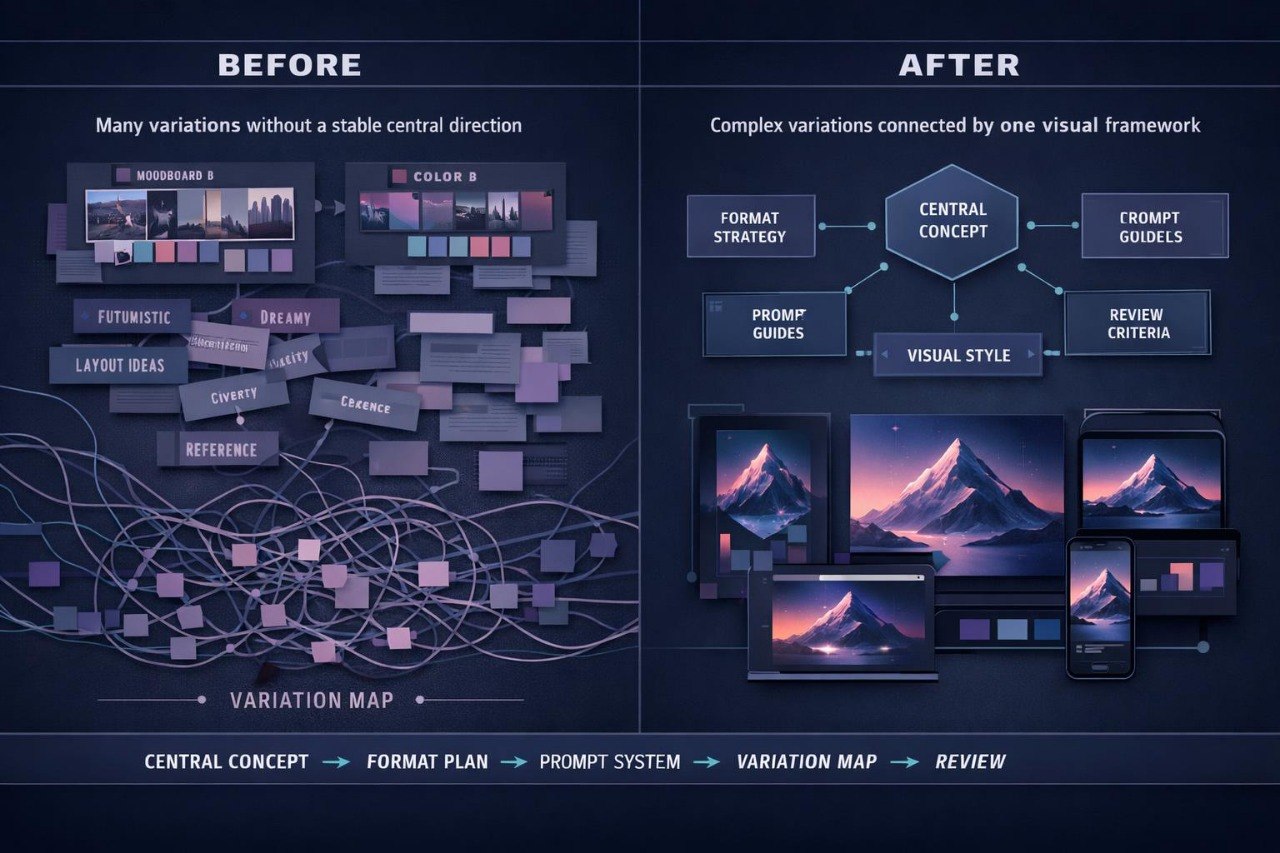
Struggling to keep a complex design direction clear across many visual variations? You’re not alone. When a project includes several formats, style decisions, reference groups, and prompt series, individual parts can gradually lose their connection. Visual variations may move away from the original idea even when each option looks interesting on its own. Without a review system, it can be difficult to understand which decisions should remain and which ones need revision. Peak Code was created for designers who need a detailed approach to building, reviewing, and maintaining one coherent creative direction.
2. Solution
This course will teach you how to manage complex AI-assisted design directions through a detailed visual system. You will learn how to define the central project idea, divide it into separate creative blocks, and set rules for each one. The materials explain how to create connected prompt series, compare variations, and document the reasons behind design decisions. You will also explore methods for working with composition, color, atmosphere, materials, and repeating elements across different formats. Peak Code helps maintain project logic from the first brief to the final set of visual materials.
3. What’s Inside
Module 1: Central Concept Framework
You will learn how to define the main project idea and turn it into a structured description. The module covers topic, purpose, emotional tone, format, style boundaries, key imagery, and visual characteristics. You will prepare a central document that can guide different stages of the project.
Module 2: Multi-Format Design Planning
This module focuses on projects that include several formats. You will explore how to adapt one creative idea for a cover, poster, visual series, presentation section, or editorial composition. The focus is on keeping a shared character without mechanically repeating the same decisions.
Module 3: Connected Prompt Systems
You will learn how to create prompt groups in which each text has a separate role. One prompt may describe composition, while another focuses on atmosphere, materials, lighting, form, or detail. The module shows how to connect these descriptions and reduce conflicting instructions.
Module 4: Visual Rule Library
You will create a project-specific library of visual rules. It may include principles for color, scale, negative space, rhythm, texture, geometry, focal points, and detail level. This library can be used to compare new variations with the original direction.
Module 5: Variation Mapping
In this module, you will group variations by their role: primary direction, alternative composition, atmosphere change, color version, or experimental branch. You will record which changes influenced each variation. This creates a clearer way to review a larger set of materials.
Module 6: Design Review Criteria
You will prepare a detailed list of criteria for reviewing visual decisions. These may include task alignment, readability, composition balance, color relationships, shape character, detail consistency, and connection to the central idea. The module also explains how to separate personal preference from specific visual analysis.
Module 7: Iteration Documentation
You will learn how to document changes between versions in a concise and structured way. Notes may include the reason for the edit, the changed element, the observation, and the next step. This approach helps preserve project logic across several review cycles.
Module 8: Complete Direction Project
The final module combines the previous topics into one practical assignment. You will prepare a brief, central concept, prompt system, rule library, variation map, and final notes. The task demonstrates the full path from an initial thought to a structured design direction.
4. Who is this for?
✅ A good fit if you work with larger sets of visual materials.
✅ A good fit if you need to maintain one creative direction across several formats.
✅ A good fit if you want to review prompts, references, and variations in more detail.
✅ A good fit if you are prepared to work with documentation, criteria, and staged reviews.
✅ A good fit if you already understand the basic principles of AI for designers.
❌ Not for you if you only need a short introduction to the topic.
❌ Not for you if you do not plan to complete practical assignments.
❌ Not for you if you want ready-made visual decisions without your own creative input.
❌ Not for you if you do not want to analyze and document changes between versions.
5. What You’ll Learn
- How to create a central concept for a complex design project
- How to distribute one idea across several visual formats
- How to build connected prompt series
- How to prepare a library of composition and style rules
- How to group and compare visual variations
- How to create criteria for detailed design review
- How to document changes between versions
- How to maintain consistency in color, form, atmosphere, and detail
- How to prepare a complete set of materials for one creative direction
- How to complete a practical project with a brief, variation map, and final notes
6. Purchase Terms
Peak Code includes structured materials for independent learning. If the course format does not meet your expectations, you may submit a refund request within 30 days according to the store policy. This period gives you time to review the materials, module structure, and practical assignments and decide whether this learning format suits your needs.
1. What is included in every Formuvo course?
1. What is included in every Formuvo course?
Each Formuvo course includes structured learning materials, clear modules, practical tasks, and examples focused on AI for designers. The materials are built to help learners explore visual thinking, prompts, composition, references, and creative direction.
2. Do I need prior AI experience?
2. Do I need prior AI experience?
No prior AI experience is required. The materials are written for learners who want a calm and structured introduction to AI-assisted design thinking.
3. What happens after purchase?
3. What happens after purchase?
After purchase, you receive the course materials included in your selected plan. You can review the lessons, exercises, and resources as part of your personal learning process.