Formuvo
Cloud Code
Cloud Code
Couldn't load pickup availability
Self-paced learning overview
- 📥 Digital file available after purchase
- ♾️ Long-term availability
- 🔒 Secure checkout
- 🗓️ Content updated in 2026
1. Problem Statement
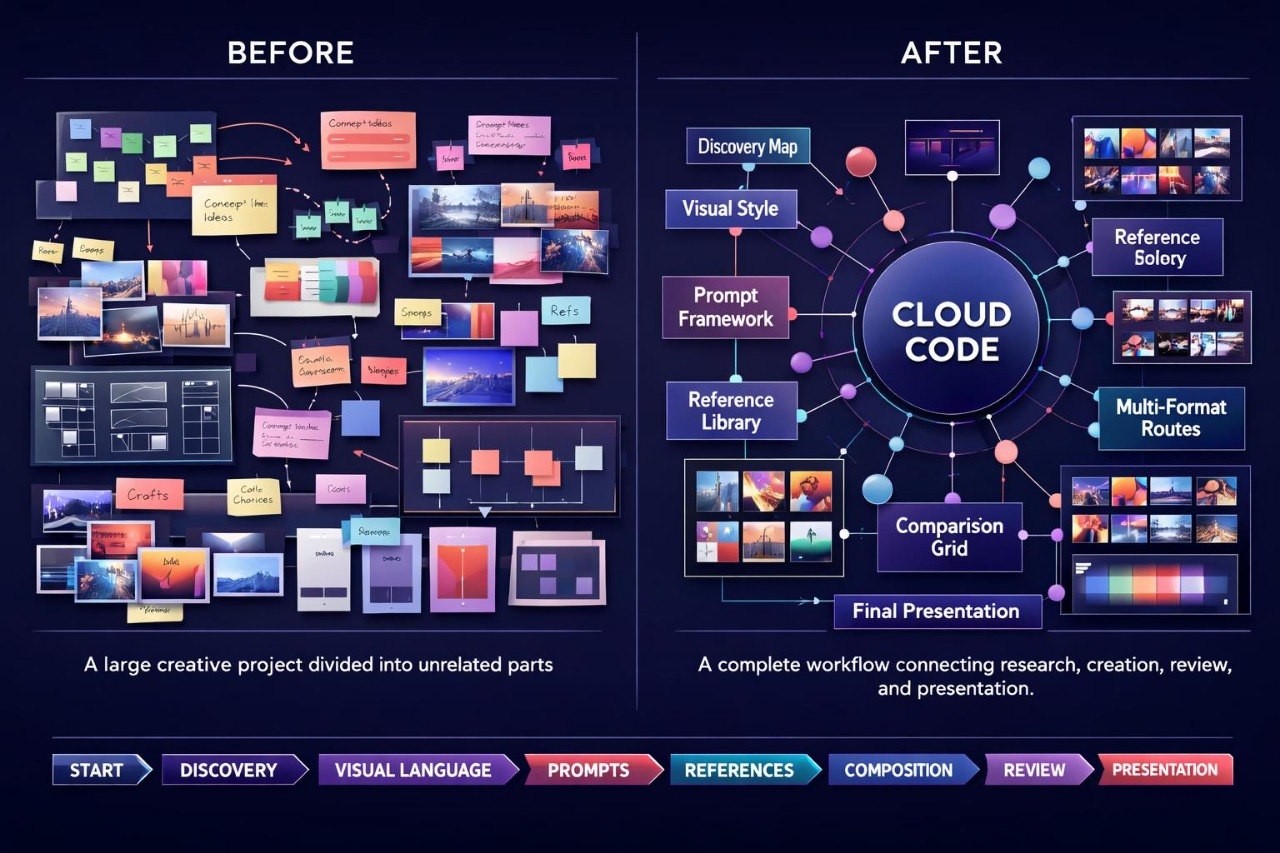
Struggling to maintain a clear structure when a creative project contains many ideas, formats, prompts, and visual variations? You’re not alone. During larger design tasks, individual decisions can gradually lose their connection to the original concept. References accumulate, descriptions become inconsistent, and different versions become difficult to compare using the same criteria. Even visually interesting materials may feel disconnected when color, composition, atmosphere, and detail are not guided by shared logic. Cloud Code was created for designers who need a detailed system for organizing an AI-supported creative process.
2. Solution
This course will teach you how to build a complete working route for complex AI-supported design projects. You will learn how to define a central concept, create a direction map, organize references, and divide prompts by function. The materials explain how to maintain one visual logic across several formats without repeating identical elements. You will also explore methods for documenting changes, reviewing variations, and preparing a clear system of rules for color, composition, form, lighting, and detail. Cloud Code helps connect separate creative stages into one consistent and well-organized process.
3. What’s Inside
Module 1: Project Discovery Map
You will begin by exploring the topic, purpose, and visual character of the future project. The module helps define the main task, intended audience, format, tone, key imagery, and creative boundaries. You will create a map showing how different ideas relate to one another.
Module 2: Central Visual Language
In this module, you will define a shared visual language for the entire project. You will describe shape character, color relationships, contrast level, texture types, lighting, space, and repeating elements. Particular attention is given to maintaining a recognizable character across several compositions.
Module 3: Layered Prompt Framework
You will learn how to create a layered prompt system. The central prompt defines the topic and direction, while supporting blocks describe composition, atmosphere, materials, lighting, scale, color, and detail. You will also explore how to revise one block without rebuilding the entire structure.
Module 4: Reference Cloud
This module focuses on creating an organized environment for references. You will group materials by function, including composition, mood, palette, typographic rhythm, texture, space, objects, and visual metaphors. Each group will include short notes explaining its practical role in the project.
Module 5: Composition Network
You will explore how one composition logic can work across several formats. The module covers focal points, negative space, visual hierarchy, scale, rhythm, repetition, and balance. You will prepare several composition schemes and identify which elements may change and which should remain stable.
Module 6: Color and Atmosphere System
In this module, you will build a system for working with color and mood. You will define primary, supporting, and accent shades, describe lighting character, and connect the palette with the project theme. You will also review ways to check whether different variations maintain a shared atmosphere.
Module 7: Multi-Format Direction
You will learn how to carry one concept across different types of design materials. These may include covers, posters, editorial pages, presentation compositions, image series, or informational sections. The aim is adaptation of shared rules rather than direct duplication.
Module 8: Variation Branches
This module helps organize alternative options without losing the central direction. You will create separate branches for composition, color, atmosphere, materials, and detail level. Each branch will include a short purpose statement and a list of changed parameters.
Module 9: Review and Comparison Grid
You will prepare a comparison grid for visual variations. Criteria may include brief alignment, composition logic, readability, color relationships, detail character, reference connection, and series coherence. This approach supports consistent analysis rather than decisions based only on first impressions.
Module 10: Iteration Notes
You will learn how to keep concise notes after each revision cycle. Records will include the original observation, changed parameter, resulting outcome, and next decision. The module also explains how to retain earlier versions so you can follow the development of the concept.
Module 11: Presentation Structure
This module focuses on organizing final materials. You will define the order in which the concept, references, prompt system, variations, criteria, and final compositions are presented. The aim is to make the creative process understandable without unnecessary explanation.
Module 12: Complete Cloud Project
The final assignment combines all course topics. You will prepare a central concept, idea map, reference library, layered prompt system, composition rules, color scheme, several variations, and final notes. The result will be a structured learning project demonstrating the complete process behind one visual direction.
4. Who is this for?
✅ A good fit if you work on complex creative projects with several formats.
✅ A good fit if you want to organize larger collections of prompts, references, and visual variations.
✅ A good fit if maintaining one composition and style logic matters to your work.
✅ A good fit if you are prepared to keep notes, review changes, and compare versions.
✅ A good fit if you want to create your own organized AI-supported design process.
✅ A good fit if you already understand the earlier principles of prompting and visual planning.
❌ Not for you if you only need a brief introduction to the topic.
❌ Not for you if you do not plan to complete practical assignments.
❌ Not for you if you want ready-made design decisions without your own creative input.
❌ Not for you if you do not want to work with structure, documentation, and analysis.
❌ Not for you if your learning topic is unrelated to AI for designers.
5. What You’ll Learn
- How to define a central concept for a larger creative project
- How to create a map of connected ideas and visual directions
- How to build layered prompt systems
- How to organize references according to their function
- How to describe a shared visual language
- How to use composition rules across several formats
- How to create a system for color, lighting, and atmosphere
- How to adapt one concept to different design materials
- How to divide visual variations into clear branches
- How to compare versions using defined criteria
- How to document changes between revision cycles
- How to organize the final presentation of a creative process
- How to prepare a comprehensive learning project with connected materials
- How to develop a consistent personal route for working with AI in design
6. Purchase Terms
Cloud Code includes structured materials for independent learning. If the course format does not meet your expectations, you may submit a refund request within 30 days according to the store policy. This period allows you to review the structure, modules, and practical assignments and decide whether the course matches your learning needs.
1. What is included in every Formuvo course?
1. What is included in every Formuvo course?
Each Formuvo course includes structured learning materials, clear modules, practical tasks, and examples focused on AI for designers. The materials are built to help learners explore visual thinking, prompts, composition, references, and creative direction.
2. Do I need prior AI experience?
2. Do I need prior AI experience?
No prior AI experience is required. The materials are written for learners who want a calm and structured introduction to AI-assisted design thinking.
3. What happens after purchase?
3. What happens after purchase?
After purchase, you receive the course materials included in your selected plan. You can review the lessons, exercises, and resources as part of your personal learning process.